
Learn how to spot a phishing email effectively. This article reveals key tactics scammers.
View More

Multi-factor authentication only truly protects accounts when each factor uses a separate channel. If both steps rely on the same method, attackers can still break in by capturing both at once.
Picture this: multi-factor authentication is live on every business account, and the assumption is that most cyber threats are now locked out. The reality is sharper than that. How you set up that second step decides whether the door actually closes.
Multi-factor authentication (MFA) means a password alone no longer gets anyone in. It adds another step, like a code sent to a phone or a fingerprint scan, to confirm the person logging in is who they claim to be. That extra layer exists to stop attackers who've already gotten hold of a stolen password.
A password by itself rarely holds up as business protection, since attackers have learned to trick people into handing passwords over directly. Worse, they can sometimes capture the second step too, if it isn't set up carefully. That gap is exactly why understanding what is multi-factor authentication and how it actually works matters so much for keeping accounts safe.
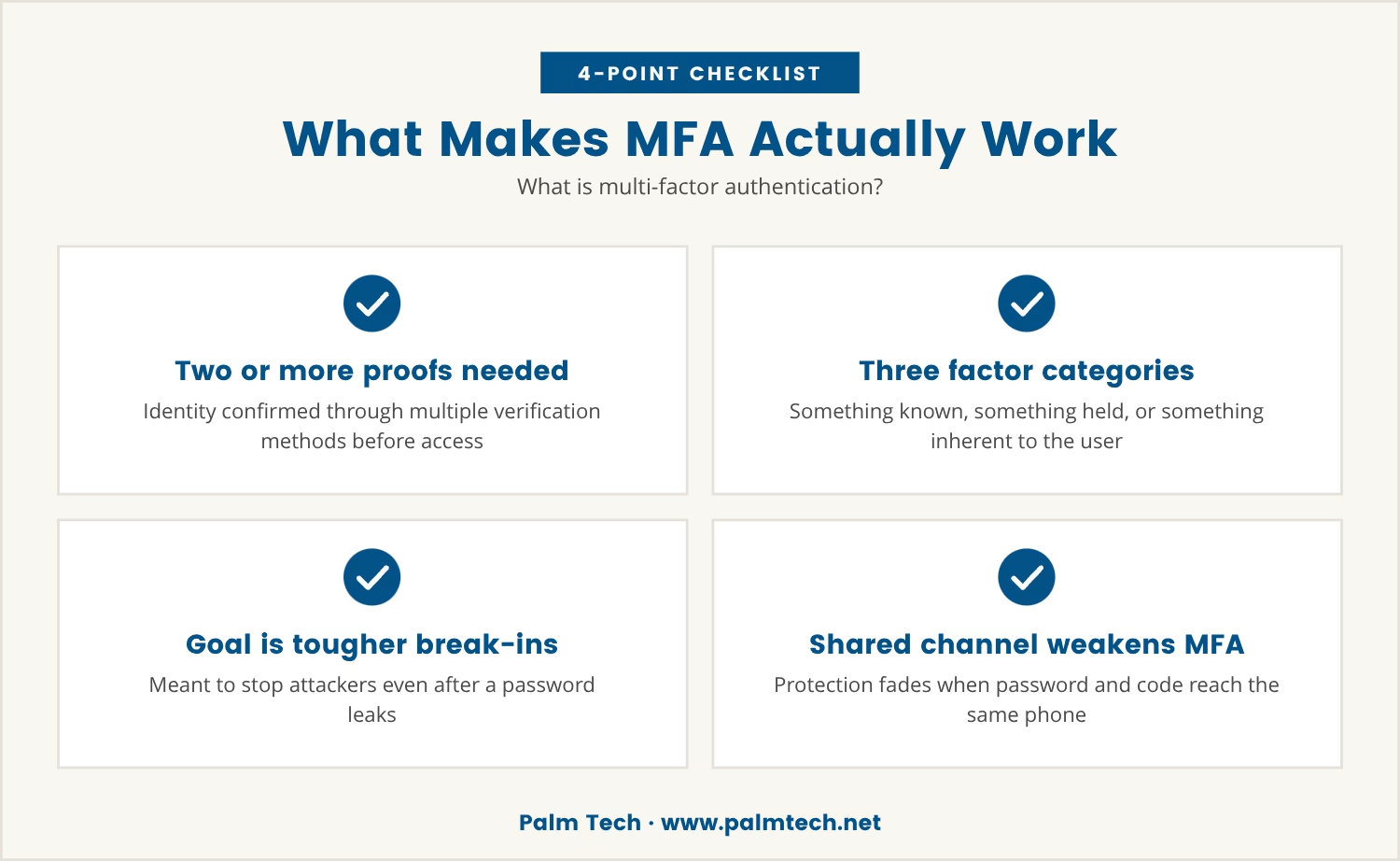
Relying on the same channel for both steps, like a password followed by a text-message code sent to that same phone, can leave less protection than it appears to offer. The real strength of MFA shows up only when each step travels through a different channel, which is what makes a break-in genuinely harder to pull off.

Adding a second step to the login process looks like a solid defense on paper. The question that actually matters, though, is whether that step blocks attackers who already have the password.
When the second factor rides the same device or channel as the password, it inherits the same weakness. Picture a fake website that collects both the password and the phone's one-time code in a single pass, since the victim believes they're logging into something real. That trick is phishing, and it remains a common way attackers slip past basic MFA setups.
Businesses in West Palm Beach might assume any extra step counts as protection, but attackers have adjusted accordingly. They know how to intercept codes sent by SMS, and they can approve push notifications outright if they already control the device in question. Treating every second factor as interchangeable is exactly what leaves that gap open.
The fix is a second factor genuinely separate from the password's channel. Skip that, and an attacker who tricks the victim once walks away with everything needed in a single move.
Attackers have gotten good at targeting MFA systems built on a single channel, often through phishing sites convincing enough to collect both the password and the one-time code sent right after.
Because both steps happen on the same device or through the same method, such as SMS, the attacker captures both pieces in real time. The risk climbs further when employees are used to answering login prompts quickly, without pausing to check where the request actually came from.
Some attackers go a step further with malware that forwards SMS codes or intercepts push notifications outright. A business leaning on SMS-based MFA may be more exposed than it looks, since the attacker never has to break the system at all — just control the one channel carrying both steps.

Multi-factor authentication is a security measure requiring two or more ways to prove identity before an account opens up. Typically that means something known (a password), paired with something held (a phone or security key) or something inherent (a fingerprint or facial scan).
The intent is to make a break-in harder even once a password is compromised. But when both steps depend on the same device or channel, that protection thins out fast — a password followed by an SMS code sent to that same phone turns risky the moment the phone itself is compromised.
Getting real value from MFA means choosing methods that run on separate channels, so controlling one step never hands an attacker the other.
Not every MFA method offers equal protection. Here's how the common types stack up against the gap passwords leave open.
Easy to set up, yet interceptable by anyone with access to the phone or the ability to forward its messages.
Apps like Google Authenticator generate one-time codes right on the device. That makes them safer than SMS, though a compromised device still puts them at risk.
Physical keys plug into a computer or connect via Bluetooth, and since they demand the actual device in hand, remote theft becomes far harder.
Fingerprint or facial recognition adds a personal, hard-to-fake layer. Even so, a device already under an attacker's control can let biometrics get bypassed too.
A prompt lands on the device for approval, which is convenient right up until an attacker already controlling that device simply approves the login themselves.
Even with MFA switched on, certain warning signs point to a setup weaker than it looks. Watch for these:
Running each authentication factor through a different channel makes an attacker's job considerably harder. Pairing a password with a hardware security key, for instance, means stealing the secret alone isn't enough — the physical device has to be in hand too.
That separation works precisely because most attacks succeed by tricking a user into giving up information through a single channel. Control of an email account or a phone number means nothing if the security key or the biometric data sits on a channel never touched.
Multi-factor authentication services built to keep channels separate leave businesses considerably less exposed to phishing and similar attacks, which makes channel separation one of the most practical ways to raise the bar against anyone attempting to break in.
For companies in West Palm Beach, the choice of MFA methods ripples into compliance as much as day-to-day security, since some industries carry specific rules about how authentication has to work — rules a poorly chosen method can quietly violate.
Remote teams and personal devices raise the stakes further, because they increase the odds that a single channel falls under an attacker's control. Choosing MFA methods built on multiple, independent steps is what keeps one breach from cascading into a full account takeover.
Consider the setup currently in place: does it lean on a single device or channel for both steps? If so, an upgrade is worth considering.
MFA promises stronger security, but that promise holds only when each step stands on its own. An attacker who can reach both the password and the second factor through the same method finds the gap still wide open, no matter how many steps sit in front of it.
Treating every second step as equally strong is how businesses end up exposed to the very attacks MFA was meant to stop. The real fix is authentication factors that are genuinely independent, so compromising one still leaves the other holding firm.

Many companies with 25 to 150 employees think their accounts are protected just because they use multi-factor authentication, but the real risk comes when both steps rely on the same device or channel. At Palm Tech, we see how easy it is for attackers to get around weak MFA setups, and we help businesses close those gaps for good.
If you want to see how our team approaches secure authentication, or if you’re ready for a conversation about your own setup, we’re here to talk.
Get started with no onboarding fees and a 90-day no-lock-in guarantee—only for qualifying businesses ready to strengthen their authentication.
Authenticator apps generate one-time codes directly on the device, so the codes never travel over networks where interception or forwarding becomes possible. SMS codes, by contrast, can be stolen when someone gains access to the phone or tricks the carrier into transferring the number.
Full control of a device can let an attacker bypass biometric checks like fingerprint or facial recognition. Biometrics work best as one part of a multi-factor authentication setup rather than the sole line of defense.
A backup authentication method, such as a second security key or an authenticator app, should already be set up before this happens. Once the key is lost or stolen, remove it from the account settings right away and switch to the backup method to regain access.
A password alone is often easy for attackers to guess or steal outright. Requiring multiple authentication factors means unauthorized access demands something held or something inherent as well, which makes a break-in considerably harder to pull off.
Regular training should cover how phishing works, including real examples of fake login pages and suspicious messages. Employees need to verify any unexpected authentication request and never share one-time codes or credentials with anyone, even when the message looks official.

Learn how to spot a phishing email effectively. This article reveals key tactics scammers.
View More

Discover how insider threats often bypass monitoring systems. Learn effective strategies to prevent insider threats and protect your sensitive data.
View More